Thursday, 9 March 2017

Joins (Inner Joins)


JOINS

Joins:

Joins are used to retrieve data from two or more tables based on logical relationship between the tables 

Types of Joins :

            I. Inner Joins 
           II. Outer Joins
         III. Self Joins
           IV. Cross Joins


Inner Joins :

In case of inner joins matched data from both the tables are included into the result set .

Syntax : left table name alias name1 inner join | join right alias name2 on <Condition>

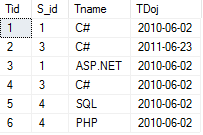
I. Here we have two tables in database 


Resultant Set :


II.Query for Inner Joins Based on Conditions 

Resultant Set :


Note :
Here by the condition of join , Sid colum of tblStudent will be compared with the second table column S_id .  Sid will be compared with all the record of S_id ,
 if condition true then it will take the Tname  from tbltraining table  
        
  Hope you all understand the Joins and Inner Joins with simple Example  


  Do have any query regarding my code you can comment below !!! 


 .
     

Wednesday, 8 March 2017

Calling One Stored procedure From Another Stored Procedure

Calling One Stored procedure From Another Stored Procedure

I.Create Stored Procedure to display employee details 


II.Create another Stored Procedure to call First Stored Procedure 


III.Execute the Second Stored Procedure 

Resultant Set:


Hope you understand the simple concept of calling one in another stored procedure 

Do have any query regarding my code you can comment below !!! 

Finding Highest and lowest Value in Table(Highest Nth Value and Lowest Value )

Finding nth Highest Value in Table 

In many interviews you may get these kind of questions so here is different way to solve this 

I. Enter to Database 

 Use Employee ;

II. Display all the details of Employee table 

  Select * from tblEmployee;


III. To Find Nth Highest Salary in tblEmployee


Resultant set:

IV. To Find 2nd Highest Salary in tblEmployee


Resultant set:

V. To Find Lowest Salary in tblEmployee


Resultant set:

VI. To Find 2nd Lowest Salary in tblEmployee


Resultant set:

Using Corelated Sub Query

VII. To Find Nth Highest Salary in tblEmployee


Resultant set:

VIII. To Find 2nd Highest Salary in tblEmployee


Resultant set:

IX. To Find Lowest Salary in tblEmployee


Resultant set:


X. To Find 2nd Lowest Salary in tblEmployee


Resultant set:


Hope you all understand how to find the Highest and lowest value in given table  ..  


Do have any query regarding my code you can comment below !!! 

CRUD Operations using Stored Procedure

  CRUD Operations using Stored Procedure

I. Enter into Database

      use Employee;

II.Create a StroredProcedure For CRUD Operations :

     here we need to declare input parameter which we are passing with '@' prefix to variable .

     Example: @Eid,@EName,@Dept,@Salary,@Action are input parameter.

create proc spCRUD
     @Action varchar(50),
     @Eid int ,
     @EName varchar(50),
     @Dept varchar(50),
     @Salary int


III.Action to Display Details of tblEmployee

   if @Action='Select'
begin 
select * from tblemployee;
end

IV.Action to insert values in tblEmployee

    if @Action='Insert'
begin 
insert into tblemployee values(@Eid,@EName,@Dept,@Salary);
end

V. Action to Update in tblEmployee

    if @Action='Update'
begin
update tblemployee set Eid=@Eid, Ename=@EName,Dept=@Dept,Salary=@Salary
         where Eid=@Eid;
end

 VI. Action to Delete in tblEmployee

    if @Action='Delete'
begin 
delete  from tblemployee where Eid=@Eid;
end 


VII. Display tblEmployee details with Stored Procedure 

 Resultant Set:


VIII. Insert Values in tblEmployee in Stored Procedure 


 Resultant Set:


IX. Update Values in tblEmployee in Stored Procedure


 Resultant Set:


X. Delete Values in tblEmployee in Stored Procedure


XI.Displaying Table Details 


Resultant Set:


Hope you all understand the CRUD Operation using  Stored Procodure  ..  


Do have any query regarding my code you can comment below !!! 


Tuesday, 7 March 2017

Stored Procedure with simple example using sql server

Simple way to create Stored Procedure 


i. First we need to Create Database  in Sql Server.

       Create  database Employee;

ii. Enter to Database.

       use employee;

iii. Need to Create table with tblemployee.
       create table tblemployee
          (
          Eid int ,
          EName varchar(50),
          Dept varchar(50),
          Salary int 

         )

iv. It shows how to insert values in tblemployee.

     insert into tblemployee values (1,'Ravi','Civil',20000);
     insert into tblemployee values (2,'Raju','Mech',35000);

v. Display all the record of tblemployee.

       select * from tblemployee


vi. Resultant will be display here:


Same thing can be done in Stored Procedure 

vii. We need to create a Stored Procedure by the name spEmployee to display all record in                       tblemployee.


      create proc spEmployee 
      as
      begin 
      select * from tblemployee;
      end 


viii. This exec/execute command will execute the StoredProcedure.

       exec spEmployee;


ix. Resultant of Stored Procedure :


Hope you all understand the simple example of Stored Procodure ..


Do have any query regarding my code you can comment below !!!